
1. 认识Nano Banana

Nano Banana(正式名称为Gemini 2.5 Flash Image)是谷歌公司研发的一款前沿人工智能图像生成与编辑模型。该模型于 2025 年 8 月正式发布,并作为核心组件被整合进谷歌的 Gemini AI 产品矩阵。
此模型基于深度学习与多模态技术,赋予用户通过自然语言指令进行高级图像操控的能力。其核心功能包括:
- 精细化编辑: 支持对图像元素进行精准调整,如发型重塑、背景替换等。
- 主体一致性: 能够在多次迭代生成或编辑过程中,维持特定人物或物体的身份特征与视觉连贯性。
- 多图像融合: 可将多张独立图像的元素与风格进行智能融合,创造出单一的、高整合度的视觉作品。
- 情境感知编辑: 模型内置了广泛的世界知识库,使其能够理解并执行具有复杂逻辑和现实背景的编辑指令。
在技术规格方面,Gemini 2.5 Flash Image 支持包括 1024×1024 和 1792×1024 在内的八种标准输出分辨率。为确保AI生成内容的可追溯性与透明度,该模型还集成了 SynthID 数字水印技术,通过嵌入不可见的数字签名来明确标识其 AI 生成来源。
2. 谷歌官方提示指南和策略
官方教程链接:https://ai.google.dev/gemini-api/docs/image-generation?hl=zh-cn#prompt-guide
要掌握 Gemini 2.5 Flash 图片生成功能,首先要了解一个基本原则:
描述场景,而不仅仅是列出关键字。 该模型的核心优势在于其深厚的语言理解能力。与一连串不相关的字词相比,叙述性描述段落几乎总是能生成更好、更连贯的图片。
用于生成图片的指示
以下策略将帮助您创建有效的提示,以生成您想要的图片。
逼真场景
对于逼真的图片,请使用摄影术语。提及拍摄角度、镜头类型、光线和细节,引导模型生成逼真的效果。
模板:
A photorealistic [shot type] of [subject], [action or expression], set in
[environment]. The scene is illuminated by [lighting description], creating
a [mood] atmosphere. Captured with a [camera/lens details], emphasizing
[key textures and details]. The image should be in a [aspect ratio] format.

一张写实风格的 [镜头类型],拍摄对象是 [主体],[动作或表情],置于 [环境] 中。场景由 [光线描述] 照亮,营造出 [氛围]。使用 [相机/镜头信息] 拍摄,强调 [关键纹理和细节]。图像采用 [画面比例] 格式。
提示:
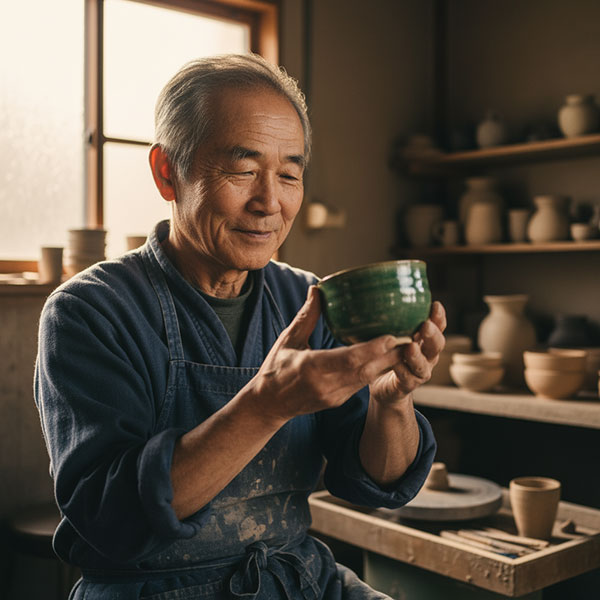
A photorealistic close-up portrait of an elderly Japanese ceramicist with
deep, sun-etched wrinkles and a warm, knowing smile. He is carefully
inspecting a freshly glazed tea bowl. The setting is his rustic,
sun-drenched workshop. The scene is illuminated by soft, golden hour light
streaming through a window, highlighting the fine texture of the clay.
Captured with an 85mm portrait lens, resulting in a soft, blurred background
(bokeh). The overall mood is serene and masterful. Vertical portrait
orientation.

这是一张写实风格的特写肖像,描绘了一位年长的日本陶艺家,他脸上布满岁月留下的深深皱纹,却带着温暖而睿智的微笑。他正仔细端详着一只刚上釉的茶碗。场景设定在他那间充满阳光的质朴工作室里。柔和的金色夕阳透过窗户洒入室内,映衬出陶土细腻的纹理。照片使用85mm人像镜头拍摄,营造出柔和的背景虚化效果(散景)。整体氛围宁静而富有艺术气息。竖幅人像构图。
风格化插图和贴纸
如需创建贴纸、图标或素材资源,请明确说明样式并要求使用透明背景。

模板:
A [style] sticker of a [subject], featuring [key characteristics] and a
[color palette]. The design should have [line style] and [shading style].
The background must be transparent.

一款[风格]的[主题]贴纸,具有[关键特征]和[配色方案]。设计应采用[线条风格]和[阴影风格]。背景必须透明。
提示:
A kawaii-style sticker of a happy red panda wearing a tiny bamboo hat. It's
munching on a green bamboo leaf. The design features bold, clean outlines,
simple cel-shading, and a vibrant color palette. The background must be white.

一张可爱风格的贴纸,描绘了一只戴着小竹帽的快乐小熊猫,它正在津津有味地啃着一片绿竹叶。设计采用简洁的线条勾勒轮廓,运用简单的赛璐珞着色技巧,并搭配鲜艳的色彩。背景必须为白色。
图片中的文字准确无误
Gemini 在呈现文字方面表现出色。清楚说明文字、字体样式(描述性)和整体设计。

模板:
Create a [image type] for [brand/concept] with the text "[text to render]"
in a [font style]. The design should be [style description], with a
[color scheme].

为[品牌/概念]创建一张[图像类型]图片,图片内容为[要渲染的文本],字体样式为[字体样式]。设计风格应为[风格描述],配色方案为[配色方案]。
提示:
Create a modern, minimalist logo for a coffee shop called 'The Daily Grind'.
The text should be in a clean, bold, sans-serif font. The design should
feature a simple, stylized icon of a a coffee bean seamlessly integrated
with the text. The color scheme is black and white.

为一家名为“The Daily Grind”的咖啡店设计一个现代简约风格的标志。文字应采用简洁、醒目的无衬线字体。设计中应包含一个简洁的咖啡豆图标,并将其与文字无缝融合。配色方案为黑白两色。
产品模型和商业摄影
非常适合为电子商务、广告或品牌宣传制作清晰专业的商品照片。
模板:
A high-resolution, studio-lit product photograph of a [product description]
on a [background surface/description]. The lighting is a [lighting setup,
e.g., three-point softbox setup] to [lighting purpose]. The camera angle is
a [angle type] to showcase [specific feature]. Ultra-realistic, with sharp
focus on [key detail]. [Aspect ratio].

一张高分辨率的影棚灯光产品照片,展示了[产品描述]在[背景/描述]上的效果。灯光采用[灯光设置,例如三点柔光箱设置],用于[照明目的]。拍摄角度为[角度类型],旨在突出[具体特征]。照片极其逼真,[关键细节]清晰对焦。[宽高比]。
提示:
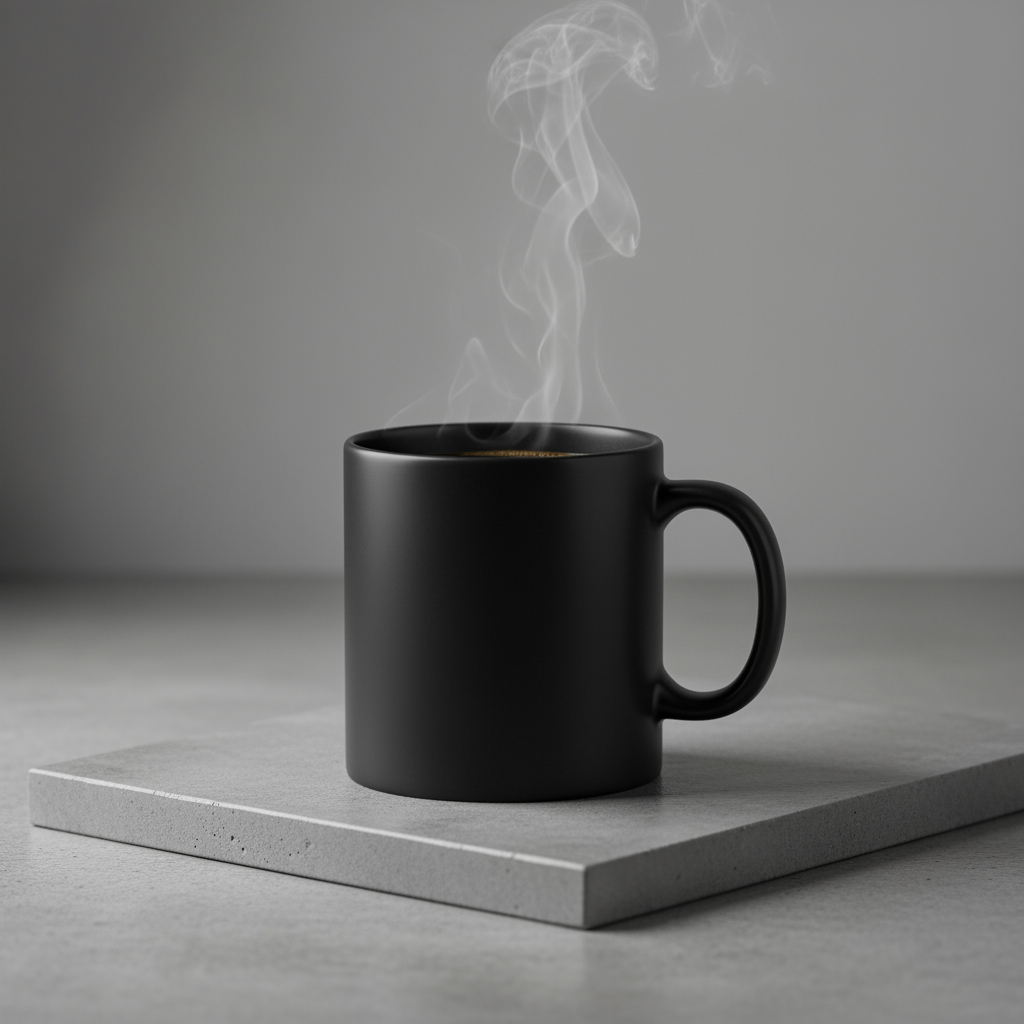
A high-resolution, studio-lit product photograph of a minimalist ceramic coffee mug in matte black, presented on a polished concrete surface. The lighting is a three-point softbox setup designed to create soft, iffused
highlights and eliminate harsh shadows. The camera angle is a slightly elevated 45-degree shot to showcase its clean lines. Ultra-realistic, with sharp focus on the steam rising from the coffee. Square image.

一张高分辨率的影棚灯光产品照片,展示了一款极简主义风格的哑光黑色陶瓷咖啡杯,摆放在抛光混凝土表面上。灯光采用三点式柔光箱布光,旨在营造柔和、均匀的高光,并消除生硬的阴影。拍摄角度略微抬高至45度,以展现其简洁的线条。画面极其逼真,清晰地聚焦于咖啡升腾的热气。正方形图像。
极简风格和负空间设计
非常适合用于创建网站、演示或营销材料的背景,以便在其中叠加文字。
模板:
A minimalist composition featuring a single [subject] positioned in the
[bottom-right/top-left/etc.] of the frame. The background is a vast, empty
[color] canvas, creating significant negative space. Soft, subtle lighting.
[Aspect ratio].

极简主义构图,画面中只有一个主体位于画面的右下角/左上角/等等位置。背景是一片广阔的空白,营造出大量的留白。光线柔和,画面比例为[宽高比]。
提示:
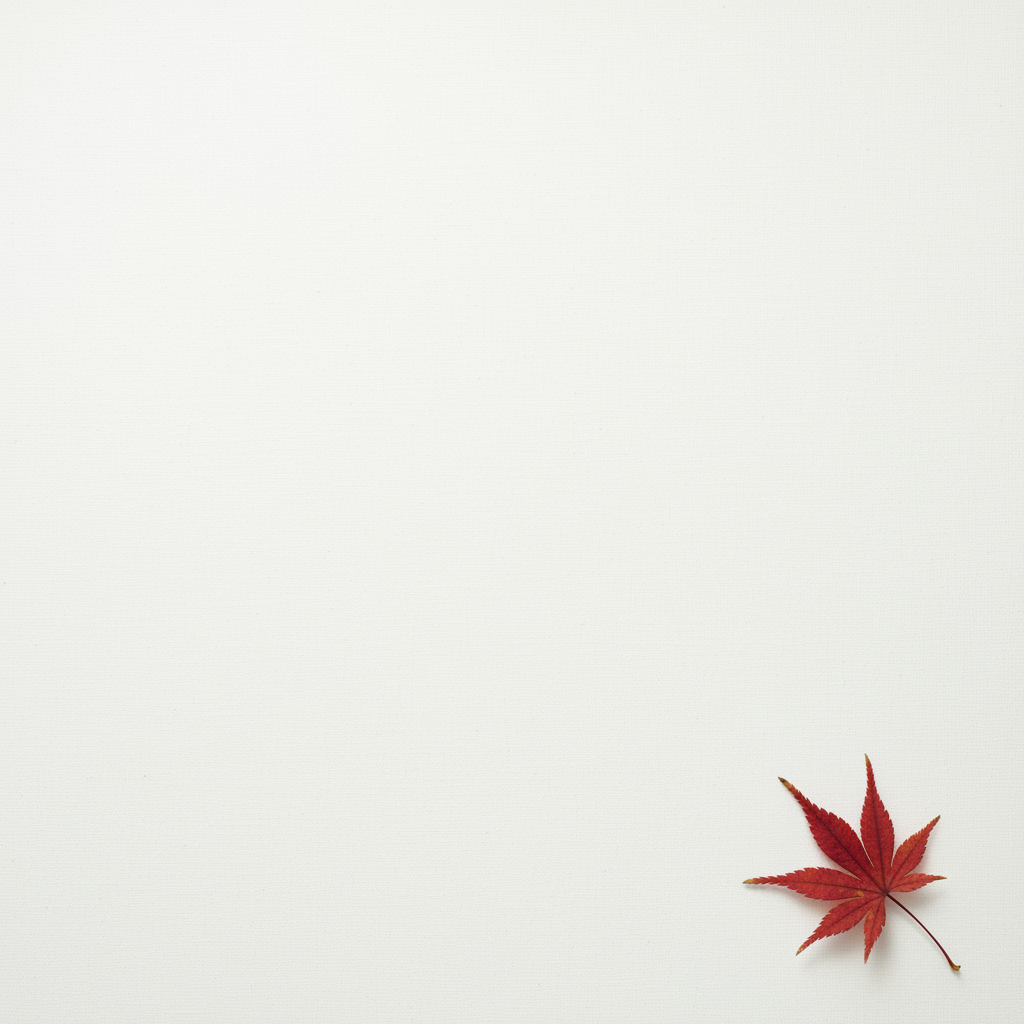
A minimalist composition featuring a single, delicate red maple leaf
positioned in the bottom-right of the frame. The background is a vast, empty
off-white canvas, creating significant negative space for text. Soft,
diffused lighting from the top left. Square image.

极简主义构图,画面右下角是一片纤细的红色枫叶。背景是一片广阔的米白色空白画布,为文字留出了大量的负空间。柔和的漫射光从左上角照射过来。正方形图像。
连续艺术(漫画分格 / 故事板)
以角色一致性和场景描述为基础,为视觉故事讲述创建分格。
模板:
A single comic book panel in a [art style] style. In the foreground,
[character description and action]. In the background, [setting details].
The panel has a [dialogue/caption box] with the text "[Text]". The lighting
creates a [mood] mood. [Aspect ratio].

一幅[艺术风格]风格的单格漫画。前景为[角色描述和动作]。背景为[场景细节]。画面中有一个[对话/旁白框],文字为[文本]。光线营造出[氛围]氛围。[宽高比]。
提示:
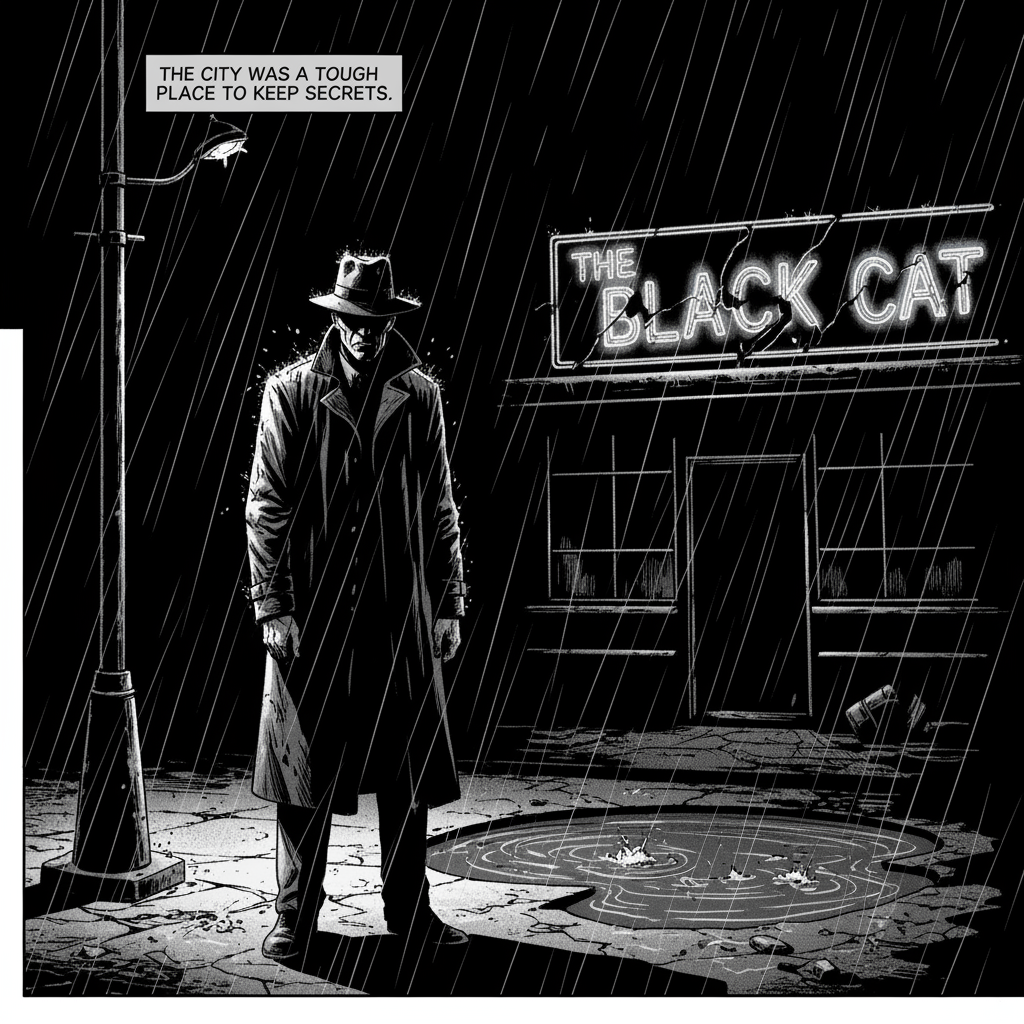
A single comic book panel in a gritty, noir art style with high-contrast black and white inks. In the foreground, a detective in a trench coat stands under a flickering streetlamp, rain soaking his shoulders. In the background, the neon sign of a desolate bar reflects in a puddle. A caption box at the top reads "The city was a tough place to keep secrets." The lighting is harsh, creating a dramatic, somber mood. Landscape.

一幅采用粗犷黑色电影风格的单格漫画,以高对比度的黑白墨线勾勒而成。前景中,一位身穿风衣的侦探站在闪烁的路灯下,雨水打湿了他的肩膀。背景中,一家破败酒吧的霓虹灯倒映在水洼里。上方的文字框写着:“这座城市,保守秘密并非易事。” 强烈的灯光营造出一种戏剧性的阴郁氛围。风景画。
用于修改图片的提示
以下示例展示了如何提供图片以及文本提示,以进行编辑、构图和风格迁移。
添加和移除元素
提供图片并描述您的更改。模型将与原始图片的风格、光照和透视效果相匹配。
模板:
Using the provided image of [subject], please [add/remove/modify] [element]
to/from the scene. Ensure the change is [description of how the change should
integrate].

请使用提供的[主题]图片,对场景中的[元素]进行[添加/移除/修改]。请确保更改能够[描述更改应如何融入]。
提示:
"Using the provided image of my cat, please add a small, knitted wizard hat
on its head. Make it look like it's sitting comfortably and matches the soft
lighting of the photo."

“请根据我提供的猫咪照片,给它戴上一顶小小的针织巫师帽。帽子要戴得舒服自然,并且与照片柔和的光线相协调。”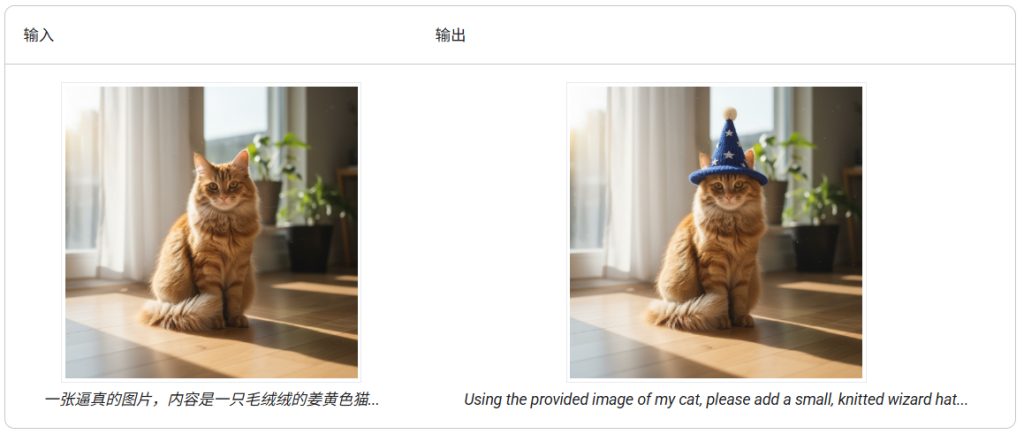
局部重绘(语义遮盖)
通过对话定义“蒙版”,以修改图片的特定部分,同时保持其余部分不变。
模板:
Using the provided image, change only the [specific element] to [new
element/description]. Keep everything else in the image exactly the same,
preserving the original style, lighting, and composition.

使用提供的图片,仅将[特定元素]替换为[新元素/描述]。保持图片中其他所有内容完全相同,保留原有的风格、光线和构图。
提示:
"Using the provided image of a living room, change only the blue sofa to be
a vintage, brown leather chesterfield sofa. Keep the rest of the room,
including the pillows on the sofa and the lighting, unchanged."

“请使用提供的客厅图片,将蓝色沙发更换为复古棕色皮质切斯特菲尔德沙发。房间的其他部分,包括沙发上的靠垫和灯光,保持不变。”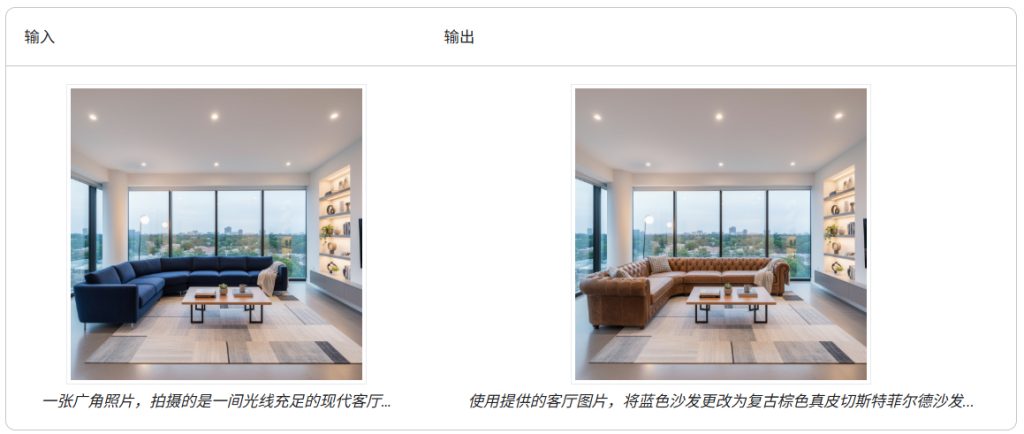
风格迁移
提供一张图片,并让模型以不同的艺术风格重新创作其内容。
模板:
Transform the provided photograph of [subject] into the artistic style of [artist/art style]. Preserve the original composition but render it with [description of stylistic elements].

将提供的[主题]照片转换成[艺术家/艺术风格]的艺术风格。保留原有构图,但用[风格元素描述]进行渲染。
提示:
"Transform the provided photograph of a modern city street at night into the artistic style of Vincent van Gogh's 'Starry Night'. Preserve the original composition of buildings and cars, but render all elements with swirling, impasto brushstrokes and a dramatic palette of deep blues and bright yellows."

“请将提供的现代城市夜景照片转换成文森特·梵高《星夜》的艺术风格。保留建筑物和汽车的原始构图,但用漩涡状的厚涂笔触和深蓝色与亮黄色的戏剧性色调来描绘所有元素。”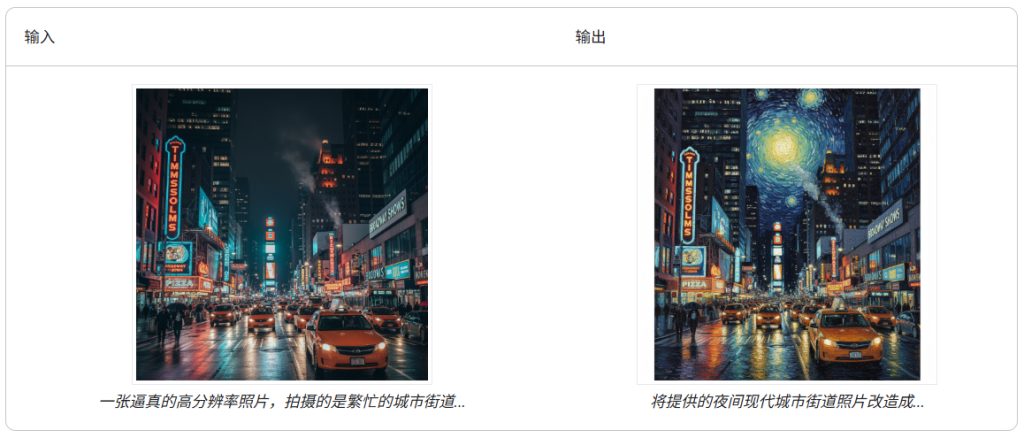
高级合成:组合多张图片
提供多张图片作为上下文,以创建新的合成场景。这非常适合制作产品模型或创意拼贴画。
模板:
Create a new image by combining the elements from the provided images. Take
the [element from image 1] and place it with/on the [element from image 2].
The final image should be a [description of the final scene].

请将提供的图像中的元素组合起来,创建一个新图像。取[图像 1 中的元素]并将其放置在[图像 2 中的元素]上。最终图像应为[最终场景的描述]。
提示:
"Create a professional e-commerce fashion photo. Take the blue floral dress
from the first image and let the woman from the second image wear it.
Generate a realistic, full-body shot of the woman wearing the dress, with
the lighting and shadows adjusted to match the outdoor environment."

“拍摄一张专业的电商时尚照片。选用第一张图片中的蓝色碎花连衣裙,让第二张图片中的女士穿上它。拍摄一张逼真的全身照,照片中的女士穿着这条裙子,并调整光线和阴影,使其与户外环境相匹配。”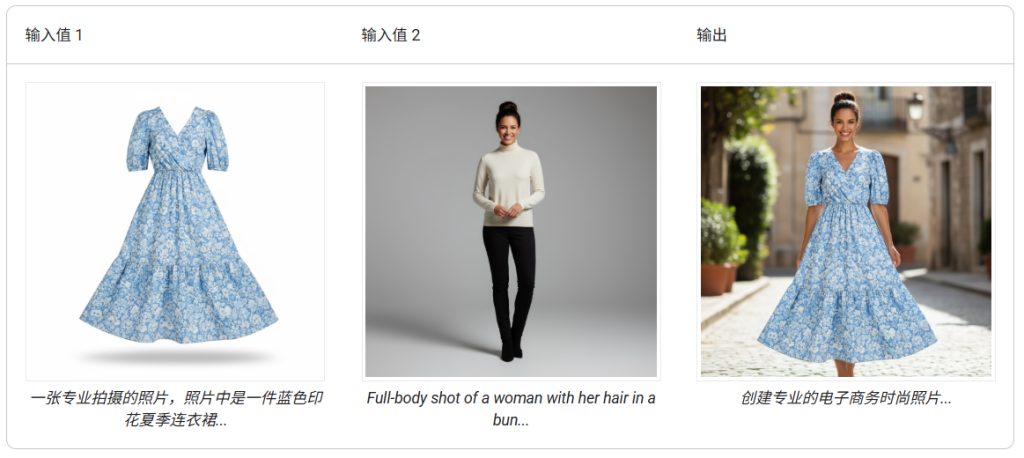
高保真细节保留
为确保在编辑过程中保留关键细节(例如面部或徽标),请在编辑请求中详细描述这些细节。
模板:
Using the provided images, place [element from image 2] onto [element from
image 1]. Ensure that the features of [element from image 1] remain
completely unchanged. The added element should [description of how the
element should integrate].

使用提供的图像,将[图像2中的元素]放置到[图像1中的元素]上。确保[图像1中的元素]的特征完全保持不变。添加的元素应[描述元素应如何集成]。
提示:
"Take the first image of the woman with brown hair, blue eyes, and a neutral
expression. Add the logo from the second image onto her black t-shirt.
Ensure the woman's face and features remain completely unchanged. The logo
should look like it's naturally printed on the fabric, following the folds
of the shirt."

“选取第一张图片,图片中的女性棕发蓝眼,表情自然。将第二张图片中的标志添加到她的黑色T恤上。确保女性的面部特征完全保持不变。标志应该看起来像是自然印在面料上的,沿着T恤的褶皱分布。”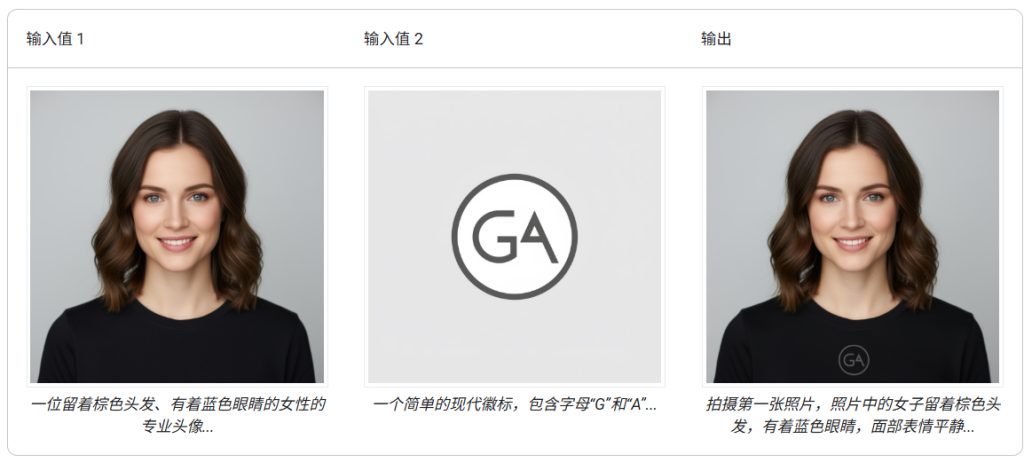
最佳做法
如需将效果从“好”提升到“出色”,请将以下专业策略融入您的工作流程。
- 内容要非常具体:您提供的信息越详细,您对结果的控制就越强。请不要使用“奇幻盔甲”这样笼统的语言,而要具体描述盔甲,例如“装饰华丽的精灵板甲,蚀刻有银叶图案,带有高领和猎鹰翅膀形状的肩甲”。
- 提供背景信息和意图:说明图片的用途。模型对上下文的理解会影响最终输出。例如,“为高端极简护肤品牌设计徽标”会比“设计徽标”产生更好的结果。
- 迭代和优化:不要期望第一次尝试就能生成完美的图片。利用模型的对话特性进行小幅更改。然后,您可以继续提出提示,例如“效果很棒,但能让光线更暖一些吗?”或“保持所有内容不变,但让角色的表情更严肃一些。”
- 使用分步说明:对于包含许多元素的复杂场景,请将提示拆分为多个步骤。“首先,创作一幅清晨薄雾笼罩的宁静森林背景。然后,在前景色中添加一个长满苔藓的古老石祭坛。 最后,在祭坛上放置一把发光的剑。”
- 使用“语义负提示”:不要说“没有汽车”,而是积极地描述所需的场景:“一条空旷荒凉的街道,没有任何交通迹象。”
- 控制相机:使用摄影和电影语言来控制构图。例如
wide-angle shot、macro shot、low-angle perspective等字词。
3. 提示词模板库
(1)图片变手办
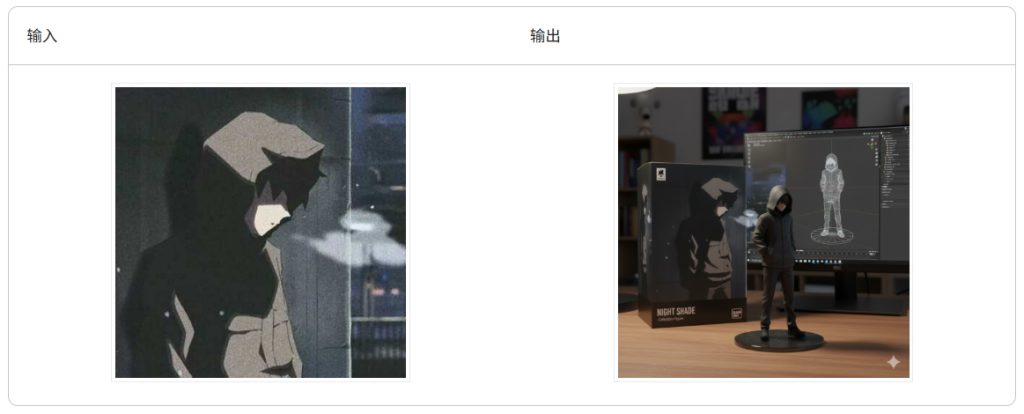
提示:
turn this photo into a character figure. Behind it, place a box with the character’s image printed on it, and a computer showing the Blender modeling process on its screen. In front of the box, add a round plastic base with the character figure standing on it. set the scene indoors if possible

将这张照片制作成人物模型。在模型后面放置一个印有人物图像的盒子,盒子上放一台电脑,屏幕上显示Blender建模过程。在盒子前面放置一个圆形塑料底座,人物模型就站在上面。如果可以,场景最好设置在室内。
(2)生成证件照
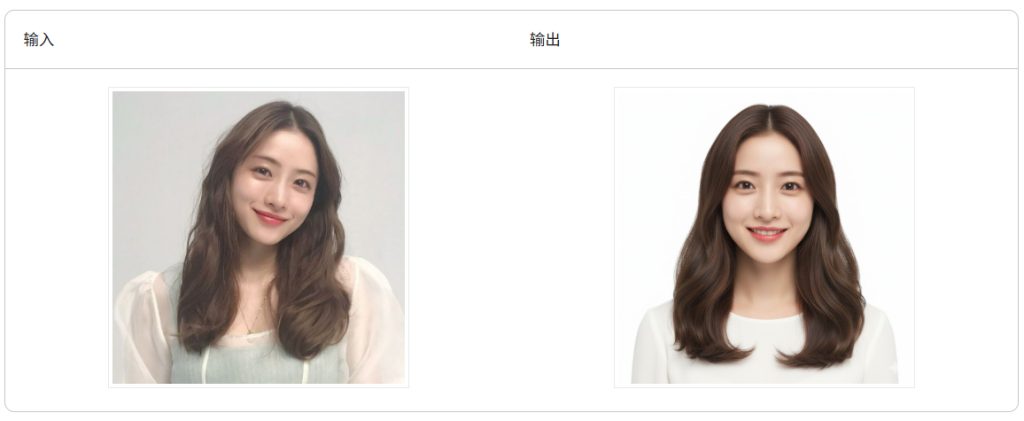
提示:
Transform the uploaded photo of any person, regardless of gender, into a chest-up passport-style photo with a solid white background. The subject should face the camera directly, with a warm, friendly smile. Add subtle details like soft, even lighting, a neat and well-groomed appearance, and a slight head tilt for a natural look, ensuring versatility for all individuals.

无论性别,上传的任何人物照片均可转换为胸部以上、纯白色背景的护照照片。被摄者应正对镜头,面带温暖友好的微笑。添加柔和均匀的光线、整洁得体的仪容以及略微倾斜的头部等细节,营造自然感,确保适用于所有人。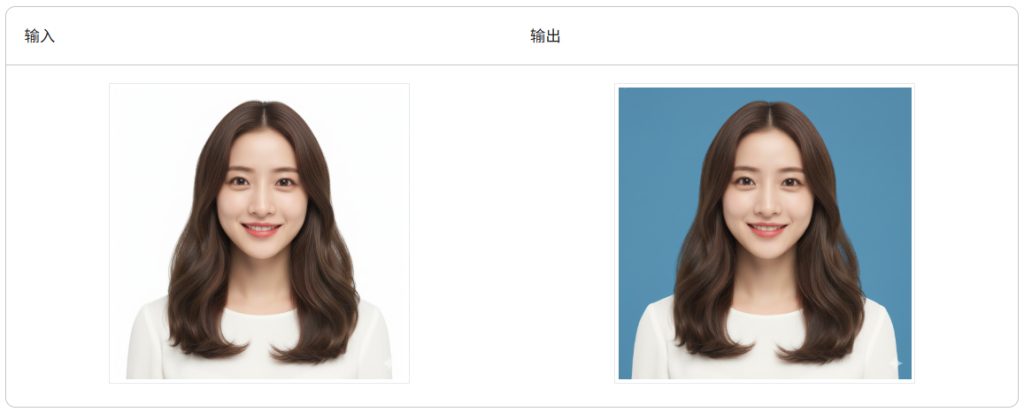
提示:
Transform the uploaded photo by changing the background color to solid blue, while preserving all details and consistency of the person in the image. Ensure the subject's appearance, lighting, and features remain unchanged, focusing solely on the background replacement.

将上传的照片背景颜色更改为纯蓝色,同时保留照片中人物的所有细节和特征。确保人物的外貌、光线和特征保持不变,只专注于背景的替换。
部分证件照对底色要求比较高,仅仅通过纯蓝、纯红色不能精准控制,这时可以通过明确色号做到精准控制,例如红色其中的色号 Color code(#C80000)。
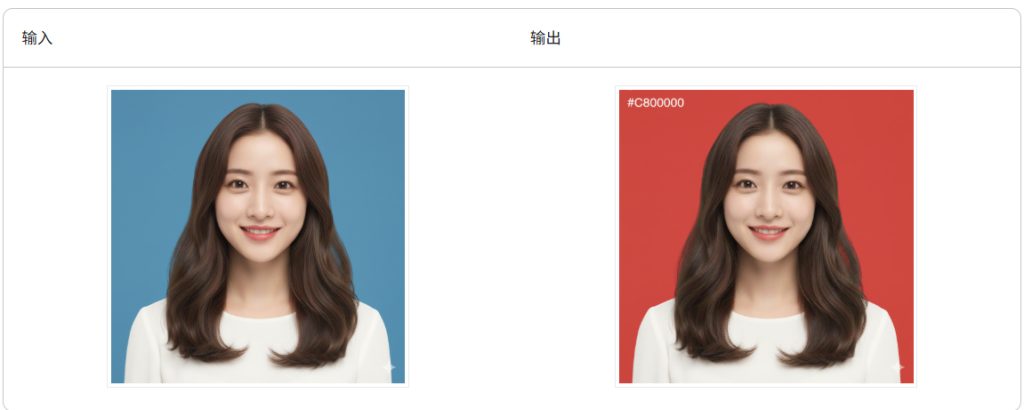
提示:
Transform the uploaded photo by changing the background color to Color code(#C80000), while preserving all details and consistency of the person in the image. Ensure the subject's appearance, lighting, and features remain unchanged, focusing solely on the background replacement.

将上传的照片背景颜色更改为色号(#C80000),同时保留照片中人物的所有细节和特征。确保人物的外貌、光线和特征保持不变,仅专注于背景替换。
(3)职场形象照
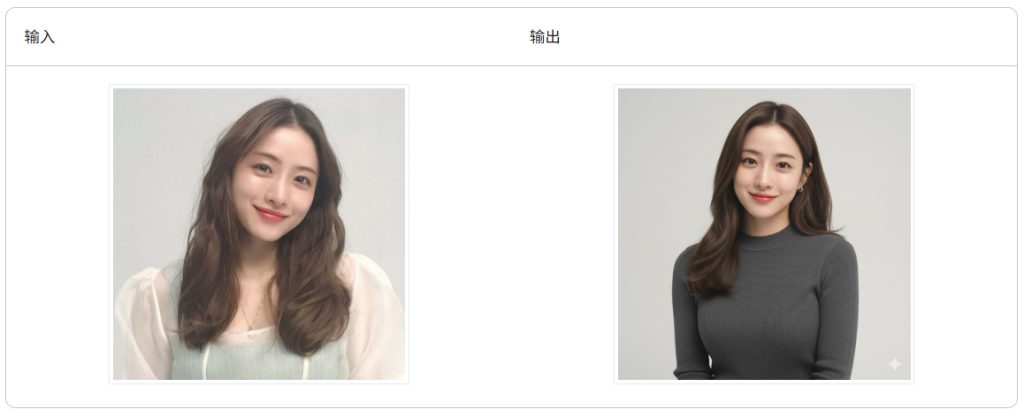
提示:
Transform the photo into a high-end studio portrait in thestyle of Apple executive headshots. The subject is shown in ahalf-body composition, wearing professional yet minimalistattire, with a natural and confident expression. Use softdirectional lighting to gently highlight the facial features,leaving subtle catchlights in the eyes.The background shouldbe a smooth gradient in neutral tones (light gray or off-white), with clear separation between subject andbackground. Add a touch of refined film grain for texture, andkeep the atmosphere calm, timeless, and sophisticated.Composition should follow minimalist principles, withnegative space and non-centered framing for a modern look.--no text, logos, distracting objects, clutter。

将照片处理成类似苹果高管头像的高端影棚肖像。人物采用半身像构图,身着专业简约的服装,表情自然自信。使用柔和的定向光轻柔地突出面部特征,并在眼中留下微妙的眼神光。背景应采用中性色调(浅灰色或米白色)的平滑渐变,人物与背景之间应有清晰的界限。添加一些细腻的胶片颗粒感,营造质感,保持画面氛围沉稳、经典而精致。构图应遵循极简主义原则,运用留白和非居中构图,打造现代感——画面中不应出现文字、标志、分散注意力的物体或杂乱的元素。
(4)黑白破损照片修复
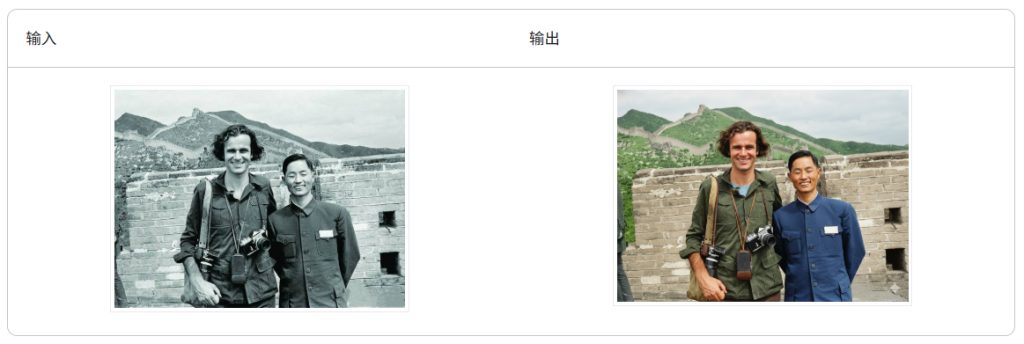
提示:
Repair this damaged old photo by removing all creases, cracks, stains, and scratches. On the basis of completing missing details and improving overall clarity, the entire photo is fully colored. Please apply realistic, natural, and vivid colors to the characters, clothing, and all background elements including the sky, mountains, vegetation, and buildings in the photo, ensuring that the colors of the entire image are harmonious and consistent with the times. Be faithful to the original background to match the quality and details of the subject being photographed**

修复这张受损的老照片,去除所有折痕、裂缝、污渍和划痕。在补全缺失细节、提升整体清晰度的基础上,对整张照片进行完整的彩色化处理。请为照片中的人物、服装,以及包括天空、山脉、植被、建筑在内的所有背景元素,都应用上逼真、自然且生动的色彩,确保整个画面的色彩和谐统一,并符合时代感。**忠于原始背景,以匹配拍摄对象的质量和细节**
(5)彩色模糊照片修复
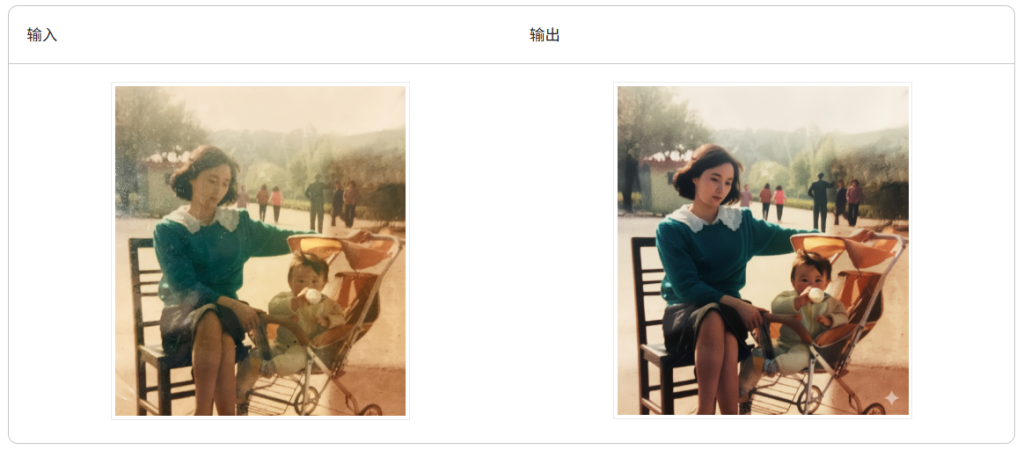
提示:
(masterpiece, best quality, ultra-detailed, photorealistic:1.3), complete restoration of an old photograph, transform into a modern professional DSLR photo, shot on Sony A7IV with 85mm F1.4 lens, crystal clear, perfect focus, 8K UHD, HDR, cinematic lighting, vibrant colors, remove all grain, noise, and artifacts, perfect natural skin texture, detailed hair, sharp eyes. **faithfully enhance the original background to match the quality and detail of the subjects.**

(杰作,最佳质量,超细节,照片级真实感:1.3),完全恢复旧照片,转换为现代专业数码单反照片,在索尼A7IV上用85mm F1.4镜头拍摄,晶莹剔透,完美对焦,8K UHD,HDR,电影级照明,鲜艳的色彩,去除所有颗粒、噪音和伪影,完美的自然皮肤纹理,细腻的头发,锐利的眼睛。**忠于原始背景,以匹配拍摄对象的质量和细节**
(6)去除多余物体
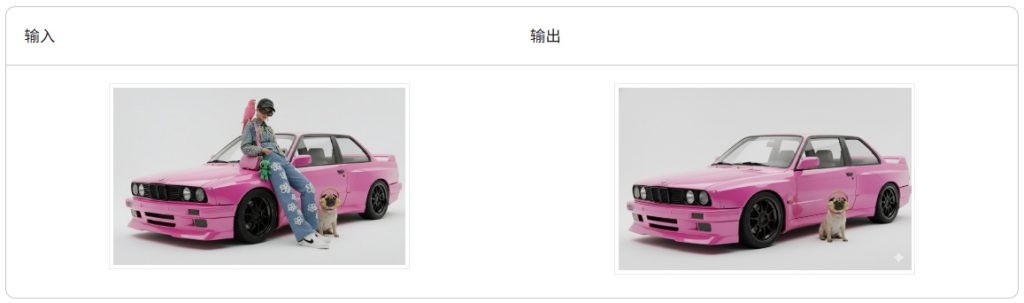
Remove the content (people and birds) and seamlessly and naturally fill the area with the surrounding background, ensuring that the texture and lighting blend perfectly with the surrounding environment.

移除内容(人和鸟),并使用周围背景无缝、自然地填充该区域,确保纹理和光影与周围环境完美融合。
(7)抠出主体元素
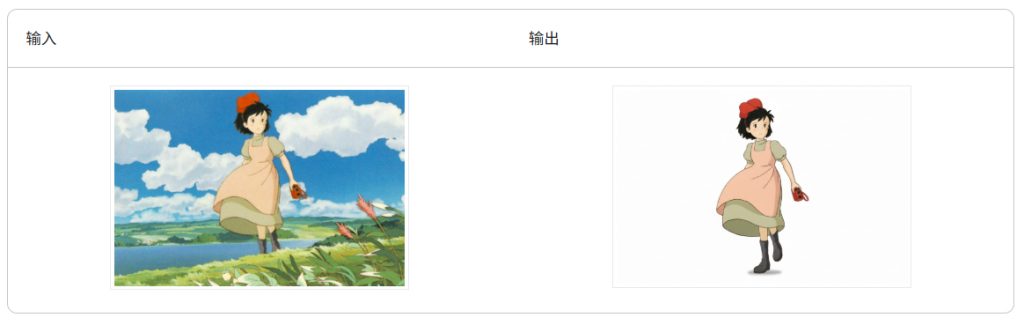
提示:
[Subject], isolated, professional cutout, clean edges, studio lighting, on a solid white background, high detail, 8k


[主体],独立,专业裁剪,边缘干净,工作室照明,纯白色背景,高细节,8k
Nano Banana 抠图功能一般,如上图所示,虽然把主体人物抠出来了,但还是重绘了鞋履部分。